Impactor does the same basic job as Sideloadly: you sign in with an Apple ID, drop an IPA on the window, and it signs the app and installs it on your iPhone over a cable. What makes it worth knowing about is everything around that. It’s open source, it runs on Linux as well as Windows and macOS, and it can make the pairing files that tools like StikDebug and Feather need.
It’s also the installer several app developers now point to by name. LiveContainer and MeloNX both recommend it in their setup docs, so if you landed here from one of those, this is the tool they mean.
Where it comes from
Impactor was called PlumeImpactor until recently, and the command-line half of the project still goes by plumesign. It’s written by the same developer as Feather, who used to publish as khcrysalis and now goes by claration on GitHub. Old links to either account land on the same repository. The code is MIT-licensed.
Development is quick. Version 2.7.0 (October 14, 2026) fixed a run of login and signing bugs and made your signing settings stick between installs. 2.7.1 and 2.7.2 followed within ten days, both mostly about Apple sign-in problems. If logging in fails on an older copy, updating is the first thing to try.
What you need
- An iPhone or iPad, no jailbreak.
- A Windows, Mac or Linux computer and a USB cable.
- An Apple ID. A free account works, and a spare one is a sensible choice since its signing certificate will live on your computer.
- On Windows, iTunes, because Impactor talks to the phone through its device drivers.
- On Linux,
usbmuxdfrom your package manager. Plug the phone in before you start Impactor, sinceusbmuxdcan stop running when no device is connected. - The IPA, from its developer or another source you trust.
Downloading the right file
Get it from the Impactor releases page on GitHub. Each release has a lot of files, and the ones you want are named Impactor-…, not plumesign-…:
- Windows:
Impactor-windows-x86_64-setup.exefor most PCs. There’s aportable.exeif you’d rather not install anything, and ARM builds for Snapdragon laptops. - macOS:
Impactor-macos-universal.dmg, orbrew install --cask impactorif you use Homebrew. - Linux: the AppImage for your architecture, or the Flathub package.
Installing an IPA
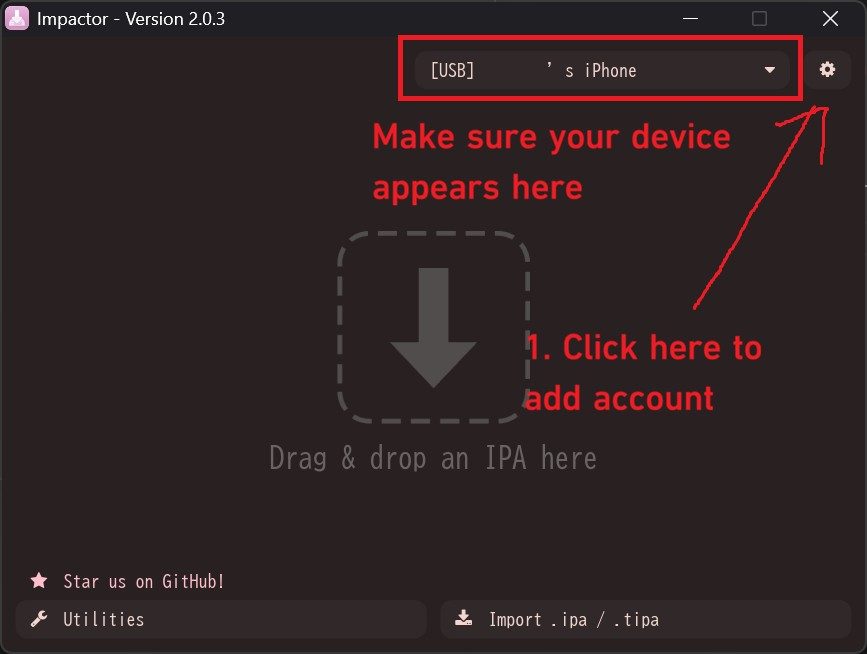
The main window. Your device goes in the dropdown at the top, accounts live behind the gear icon. Screenshot from LiveContainer’s documentation.
- Connect the iPhone with the cable, unlock it and tap Trust when it asks about the computer.
- Add your Apple ID. Click the gear icon, choose Add Account and sign in. If two-factor authentication is on, enter the code that appears on your other Apple device.
- Check the device dropdown at the top. It should show your phone with
[USB]in front. Empty? See the troubleshooting section below before going further. - Load the IPA. Drag it onto the drop zone or click Import .ipa / .tipa.
- Look over the signing options. You can change the app’s name, icon or bundle ID and inject tweaks here. For apps that ship with extensions, choosing Only Register Main Bundle saves App IDs, which matters on a free account.
- Click Install and wait. Impactor requests a certificate, registers your device, signs the app and sends it over.
- Finish on the phone. Trust your Apple ID under Settings > General > VPN & Device Management, and turn on Developer Mode under Settings > Privacy & Security if iOS asks for it. The phone restarts once.
Impactor also adds the increased memory limit entitlement on its own when an app requests it. Emulators rely on that, and it’s one reason their developers prefer Impactor to older tools.
The Utilities page
The button at the bottom left opens a set of device tools that don’t involve installing an IPA at all.
Pairing files. With the phone connected, Impactor can generate a pairing file and drop it straight into apps that use one, including SideStore, Feather, StikDebug and Antrag. That’s the file that lets those apps talk to iOS the way a trusted computer would.
SideStore and LiveContainer. Impactor can install both directly, and it can generate a certificate for SideStore or export one as a .p12 for LiveContainer to import.
Retrust. If iOS has forgotten the computer, this redoes the trust handshake without unplugging and replugging.
A pairing file only stays valid until you update, reset or re-trust the phone. When an app that depends on one suddenly can’t connect, come back here and make a new one first.
Living with a free Apple ID
Apple’s free-account rules apply here as they do everywhere: seven-day signatures, three sideloaded apps per device, ten new App IDs a week. Two Impactor-specific details are worth knowing on top of that. The signing certificate lasts 365 days and is stored on the computer that made it, so if you switch machines, copy it over, otherwise Impactor creates a fresh one. And on Linux, its automatic refresh only works while the phone is plugged in, because usbmuxd has no Wi-Fi support.
If re-signing every week gets old, install SideStore once from Impactor or iloader and let it refresh apps on the phone. Apps installed from a computer don’t show up in SideStore, though, so add them again from SideStore’s My Apps tab if you want it to look after them.
Troubleshooting
| What you see | What usually fixes it |
|---|---|
| The device dropdown is empty | On Windows, install iTunes and replug. On Linux, check usbmuxd is running and start Impactor after the phone is connected. Try another cable. |
| Login fails even with the right password | Update to the latest release, since 2.7.1 and 2.7.2 were mostly login fixes. Enter the two-factor code when the prompt appears. |
| ”Maximum number of apps” or App ID errors | You’ve hit the three-app or ten-ID limit. Remove an app, wait for old App IDs to expire, or use Only Register Main Bundle. |
| The app installs but won’t open | Step 7 isn’t finished: the profile isn’t trusted or Developer Mode is off. |
| A tweaked app crashes on launch | Install it again without the tweak. It probably doesn’t match that app version. |
| StikDebug or Feather can’t connect | Make a new pairing file from Utilities. |
FAQ
Impactor or Sideloadly, which should I use?
Both work. Pick Impactor if you’re on Linux, need pairing files, or are installing something like LiveContainer or MeloNX whose developers recommend it. Sideloadly has the longer track record and a Wi-Fi refresh that some people prefer on Windows and Mac. For options that skip the computer entirely, see every no-jailbreak method side by side.
Is Impactor the same thing as plumesign?
Same project, different front ends. plumesign is the command-line tool, Impactor is the app with a window. Most people want the app.
Can I move Impactor to a new computer without breaking my apps?
Copy its stored keys across before you sign anything on the new machine. Otherwise Impactor requests a fresh certificate, and you’ll be re-signing your apps from the new computer anyway.
If Sideloadly already works for you, there’s no need to switch. Impactor earns its place when you’re on Linux, when an app’s developer asks for it, or when you want to see exactly what the tool doing your signing is up to.