Most people meet iloader because a SideStore or StikDebug guide tells them to download it, do one thing, and close it again. That undersells it. iloader is a small desktop app for Windows, Mac and Linux that installs SideStore, installs LiveContainer with SideStore bundled in, sideloads any other IPA, and manages the pairing files and certificates that keep all of it working.
It’s the setup tool SideStore’s own documentation uses, and the one StikDebug’s guide uses for pairing files. If you came here from one of those, jump to the section you need. Otherwise it’s worth a read top to bottom, because the settings explain a lot of the errors people hit later.
What it is
iloader is written by nab138 and describes itself as a “Sideloading Companion”. The code is MIT-licensed, while the name and logo are kept separate from that license. It signs with your own Apple ID, so the usual free-account rules apply: seven-day signatures, three sideloaded apps at once, ten new App IDs a week. The method-by-method rundown explains where those limits come from and which tools avoid them.
The only official downloads are the GitHub releases page and iloader.app. Homebrew, AUR and COPR packages exist, but they’re maintained by the community, not the developer.
The project is in the middle of an overhaul, so menus may move between releases. This guide was checked against 2.4.1, released October 28, 2026.
Before you start
- usbmuxd, the service that lets a computer talk to an iPhone. On Windows it comes with iTunes, so install that. On a Mac it’s already there. On Linux it’s often installed already; if not, get it from your package manager.
- An Apple ID. It doesn’t have to be the one on the phone, and it’s case-sensitive when you type it in.
- A cable, and the phone unlocked when you plug it in.
A look at the window
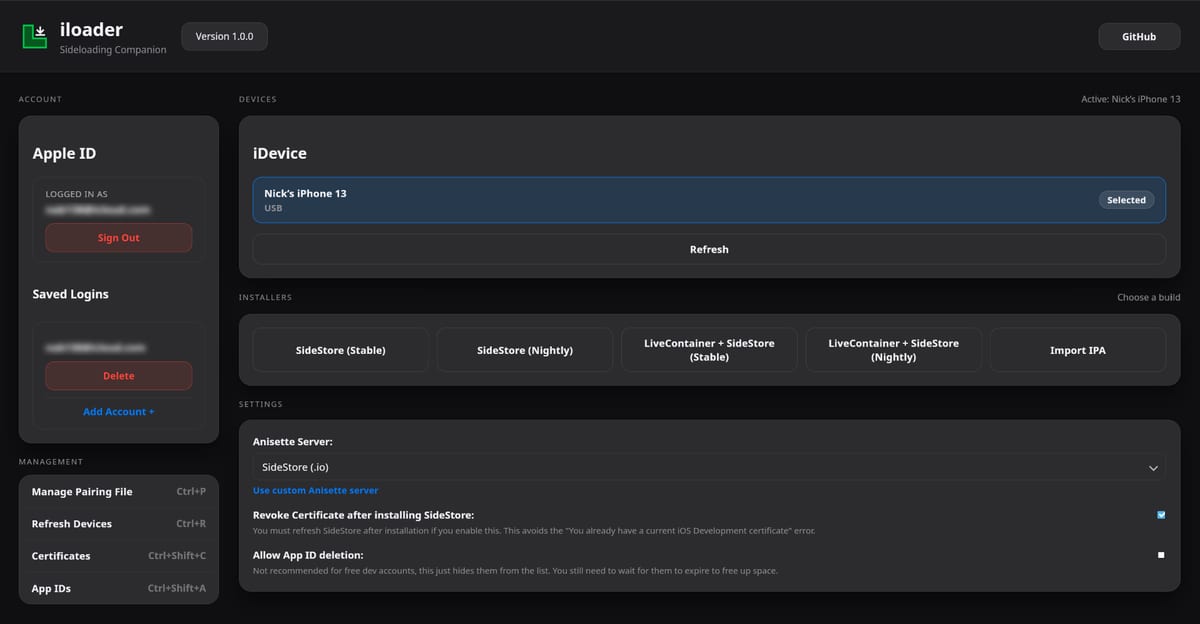
Everything lives on one screen: account on the left, device and installers in the middle, settings below. Screenshot of version 1.0.0 from iloader’s GitHub page, with email addresses blurred; newer versions keep the same layout.
Sign in under Apple ID on the left, and pick your phone under iDevice. If it isn’t listed, click Refresh after checking the phone trusts the computer.
Installing SideStore
- Connect the iPhone and tap Trust on it.
- Open iloader and sign in with your Apple ID.
- Select your device.
- Click SideStore (Stable). Nightly builds exist, but stable is the one SideStore’s docs tell you to use.
iloader signs and installs SideStore, imports the certificate into it and places the pairing file it needs, all in one go. What’s left happens on the phone: trusting the profile, Developer Mode, LocalDevVPN and signing in. The SideStore guide picks up from exactly that point.
Installing LiveContainer with SideStore
The LiveContainer + SideStore buttons install LiveContainer with SideStore built in, so the pair uses a single app slot. Use the newest iloader for this, because older versions signed LiveContainer incorrectly. Setup inside LiveContainer, including importing the certificate, is covered in the LiveContainer article.
Installing any other IPA
Import IPA takes any .ipa file and signs it with your Apple ID, the same way Sideloadly or Impactor would. Since 2.4.1 it adds the increased memory limit entitlement by default, which emulators appreciate. On the phone, trust the profile and turn on Developer Mode as with any sideloaded app.
Placing a pairing file
Some apps need a pairing file to reach iOS’s developer services from the phone itself. StikDebug is the most common one, along with SideStore and Protokolle.
- Install the app first, so iloader can find it on the phone.
- Connect the unlocked iPhone and click Manage Pairing File under Management (or press Ctrl+P).
- Click Place next to the app.
- Wait for “Pairing file placed successfully!” in green.
The file is tied to your device. Updating or resetting iOS invalidates it, and it sometimes expires for no clear reason. When an app that relies on one suddenly can’t connect, run these steps again before trying anything else.
Settings worth knowing
Anisette Server. Apple’s sign-in needs data from an anisette server, and iloader lets you pick which one. Since 2.4.0 the default is a Mac-based server the developer describes as more stable. If sign-in keeps failing, switching servers is a reasonable thing to try.
Revoke Certificate after installing SideStore. This avoids the “You already have a current iOS Development certificate” error. If it’s on, refresh SideStore on the phone right after installing.
Allow App ID deletion. Leave it off on a free account. It only hides App IDs from the list; they still count against your weekly ten until they expire.
From 2.4.0, iloader also applies the “use main profile” option by default, which reuses one profile for an app and its extensions to save App IDs.
Certificates and App IDs
The Certificates and App IDs pages under Management list what your Apple ID has created. Revoking an old certificate there fixes the “already have a certificate” error. The App ID list is mostly useful for seeing why you’ve hit the weekly limit.
When something fails
The phone doesn’t appear. On Windows, install iTunes and replug. On Linux, make sure usbmuxd is running. Unlock the phone and accept the trust prompt.
Sign-in fails, or SMS codes return a 403 error. Update to 2.4.1, which works around the SMS problem, then try a different anisette server.
Errors about the maximum number of apps or App IDs. That’s the free-account limit. Remove an app or wait a week for App IDs to expire.
Pairing file errors. Make a new one with the phone unlocked and trusting the computer.
iloader shows suggestions next to common errors, so read those first. For anything else, the developer handles support through the idevice Discord and GitHub issues. SideStore’s support channels don’t cover iloader problems.
FAQ
Do I still need iloader after SideStore is installed?
Only now and then. You’ll come back to it after an iOS update or reset to place a new pairing file, or if you need to reinstall SideStore.
What’s the difference between iloader and Impactor?
They overlap a lot: both sign IPAs with your Apple ID and both handle pairing files. iloader is built around SideStore and is what its docs use; Impactor has more signing options like tweak injection and a bundle-only mode. Having both installed costs nothing.
Can I use iloader without SideStore at all?
Sure. Import IPA works on its own, and so does the pairing file manager.
Most of the time iloader sits unused in a folder, and that’s fine. It does its job in the first ten minutes and then again for a minute after each iOS update.