If your iPhone runs the right iOS version, you can install IPA permanently with TrollStore: apps that stay put, with no 7-day timer, nothing for Apple to re-sign, and no weekly trip back to a computer to keep them alive. This guide covers what TrollStore is, which devices and iOS builds it works on, which installer you actually need, the exact steps, and how to fix the errors that come up most.
TrollStore is one route among several. If your device isn’t supported, the Sideloadly and SideStore methods in our how to install IPA files on iPhone without a jailbreak pillar are the usual fallbacks.
What TrollStore is and who it’s for
TrollStore is a free tool from developer opa334 (Lars Froder) that permanently signs and installs apps on iPhone and iPad. It isn’t a jailbreak. It doesn’t touch the file system or broadly disable security. What it does is exploit a CoreTrust signature-checking bug so iOS treats your sideloaded app as if Apple itself signed it.
That single bug is what kills the two worst parts of normal sideloading. There’s no developer certificate that expires after seven days, and there’s nothing for Apple to revoke. You install an IPA once and it behaves like a regular App Store app, surviving reboots once you’ve set up the persistence helper (more on that below).
This suits anyone stuck on an older iOS version who wants apps that don’t break every week. If you’ve already updated past the supported range, TrollStore is off the table, and that’s worth checking before you do anything else.
What you need before you start
The single most important factor is your iOS version. TrollStore relies on a bug Apple has since patched, so support is frozen to specific firmware:
- iOS 14.0 beta 2 through 16.6.1 works on supported devices.
- iOS 16.7 RC (build 20H18) is supported, but other 16.7.x builds are not.
- iOS 17.0 is supported on A12 and newer chips (iPhone XS / XR and later).
- iOS 17.0.1 and later, plus iOS 18 and iOS 26, will not work. iOS 17.0.1 patched the CoreTrust bug, and the developer has said it’s very unlikely to ever return.
Check your version under Settings > General > About > Software Version. If you’re on a supported build, do not update iOS until you’re done, and ideally not at all if you want to keep TrollStore.
You’ll also want a few minutes, enough free storage, and an IPA file you have the legal right to use. Get your apps from legitimate sources; anything dangling paid software for free is worth steering well clear of.
Here’s the part the older guides get wrong: whether you need a computer depends entirely on your build. The installer is not one-size-fits-all.
Which installer you actually need
The right installer depends on your iOS version and chip, so confirm your exact combination against the official compatibility table at ios.cfw.guide before you start.
- iOS 14.0 through 16.6.1 (and the 16.7 RC): use TrollInstallerX, which runs entirely on the iPhone. No computer needed.
- iOS 17.0 on A12+ devices: TrollInstallerX does not cover this build. You need TrollRestore, which runs from a Windows PC or Mac and installs TrollStore by restoring a modified device backup. So the newest supported build is, ironically, the one that requires a computer.
The on-device steps below describe the TrollInstallerX path. If you’re on iOS 17.0 with an A12 or newer chip, follow TrollRestore’s own instructions on a computer instead; the on-iPhone flow won’t apply to you.
Step-by-step: TrollInstallerX (iOS 14.0–16.6.1)
- Open Safari and go to the official TrollInstallerX page (linked from opa334’s GitHub and the cfw.guide instructions). Avoid random mirror sites.
- Download the installer for your device. Depending on the method, you’ll either get a file that installs directly or a profile you load through Settings.
- If prompted, trust the configuration profile. Go to Settings > General > VPN & Device Management, tap the profile, and choose Trust. This is the same flow as any sideloaded app.
- Run the installer app from your Home Screen and tap Install TrollStore (or the equivalent button). It fires the CoreTrust exploit and drops TrollStore onto your device. The screen may flash or respring during this.
- Open TrollStore. If it doesn’t appear at first, lock and unlock the phone, or reboot, then look again.
Set up the persistence helper
Don’t skip this part. When iOS reloads its icon cache, TrollStore-installed apps can quietly revert to “User” state and stop opening, throwing an “app is unavailable” message. The persistence helper prevents that.
- In TrollStore, tap Settings.
- Tap Install Persistence Helper.
- Pick a stock system app you never use, such as Tips. TrollStore embeds the helper into it.
From then on, that stock app re-registers your TrollStore apps as system apps after every reboot, which is what keeps them opening.
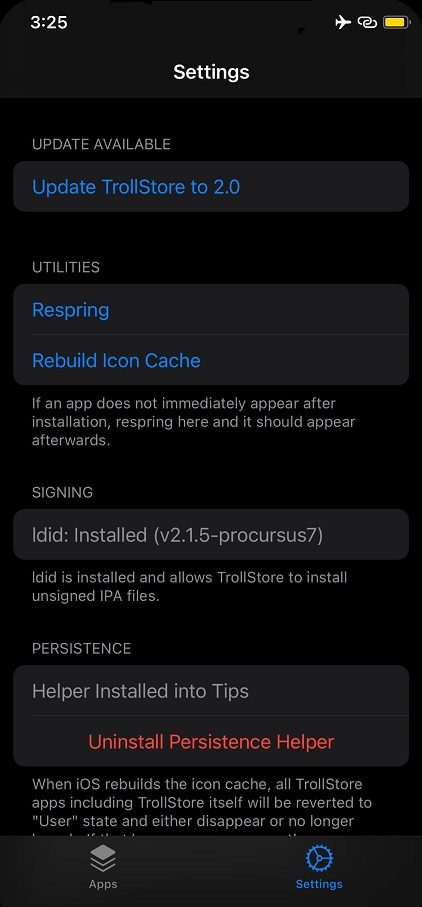
TrollStore’s Settings tab is where you install the persistence helper.
Install an IPA
- Download or AirDrop the IPA to your iPhone.
- Open the file. iOS offers to open it in TrollStore, or you can open TrollStore first and tap the + / Install button.
- Confirm the install. The app lands on your Home Screen and stays there. No timer, no re-signing.
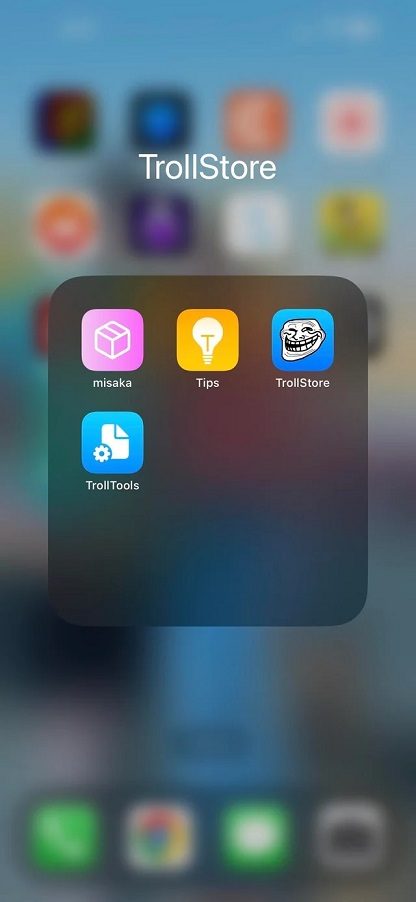
Once TrollStore is set up, installed apps sit on the Home Screen permanently.
Tips and troubleshooting
“Untrusted Developer” when opening the installer. Head to Settings > General > VPN & Device Management, tap the developer profile, and choose Trust. This applies only to the initial installer, not to apps installed through TrollStore.
An app suddenly won’t open after a reboot. This almost always means the persistence helper isn’t set up, or it broke. Reinstall it from TrollStore > Settings > Install Persistence Helper. If the install keeps failing, fully power off, turn the phone back on, open your chosen helper app once, swipe it away from the app switcher, then try again.
The installer fails or TrollStore won’t appear. Free up storage, reboot, and retry. A corrupted or wrong-version download is the usual culprit, so re-grab the file matching your exact iOS build.
An installed app crashes on launch. The IPA may be incompatible or damaged. Try a clean copy from a legitimate source.
Removing an app or TrollStore itself
Getting rid of a TrollStore app is the same as any other: touch and hold its icon, then choose Remove App, or do it from inside TrollStore. There’s no expiring certificate or device-management profile to clear afterward, because the install was permanent rather than tied to a 7-day signature.
Want TrollStore gone too? It can uninstall itself. Open TrollStore, go to Settings, and use the option to uninstall TrollStore, which also tears down the persistence helper it embedded in your chosen stock app.
FAQ
Why don’t TrollStore apps need re-signing every 7 days like Sideloadly apps?
Because TrollStore doesn’t use a developer certificate at all. The 7-day clock and revocation only exist when you sign with an Apple ID. TrollStore bypasses signature verification entirely, so there’s nothing to expire.
Can I install TrollStore on iOS 18?
Not anymore. iOS 17.0.1 patched the underlying CoreTrust bug, so anything on 17.0.1 or newer, including iOS 18 and 26, is out. For those versions, look at SideStore or eSign instead.
Do I need a computer to install TrollStore?
It depends on your build. iOS 14.0 through 16.6.1 installs fully on-device with TrollInstallerX. iOS 17.0 on A12+ chips needs TrollRestore, which only runs from a Windows PC or Mac.
Will updating iOS delete TrollStore and my apps?
A major iOS update will typically wipe TrollStore and everything installed through it, and likely move you to an unsupported version with no way back. Hold off on updates if you want to keep it.
If your iPhone is on a supported build, TrollStore lets you keep sideloaded apps around without nursing a certificate back to life every week. Confirm your iOS version, pick the matching installer, set up that persistence helper, and your installs will behave like ordinary App Store apps.