If you want to install IPA with SideStore, the payoff is simple: do one round of setup on a computer, then your iPhone re-signs apps over Wi-Fi on its own, so you don’t plug in every week to keep them alive. This guide covers what SideStore is, what you need, the real install steps with the actual menu paths, and how to clear the errors that stop most people cold.
It’s one of several ways to get an IPA onto your iPhone without a jailbreak. If you want the full overview of your options first, start with how to install IPA files on iPhone without a jailbreak.
What SideStore is, and who it’s for
SideStore is an open-source fork of AltStore. The original AltStore needs a desktop app (AltServer) running and reachable to refresh your apps; SideStore moves that refresh job onto the phone itself using a local VPN tunnel. You still do a one-time setup on a computer, but after that the phone re-signs apps in the background over Wi-Fi.
It’s a good fit if you don’t have a Mac or PC handy day to day, or you got tired of AltStore failing to refresh because the computer was asleep. It signs apps with your own Apple ID certificate, which means the apps are tied to you and behave like the developer-test apps Apple already allows. SideStore is free and stays free.
If you’d rather avoid a computer entirely and your iPhone runs an older chip, TrollStore gives permanent installs with no 7-day expiry, though it only works on specific iOS versions. For a pure desktop sideloader, Sideloadly is the simpler tool if you don’t mind plugging in.
What you need before you start
- An iPhone or iPad on iOS/iPadOS 14.0 or later (very new point releases sometimes need the Nightly or Alpha build — more on that below).
- A passcode set on the device.
- A computer (Windows 8+, macOS, Linux, or a recent un-enrolled Chromebook) for the initial install only.
- A USB/Lightning or USB-C cable.
- An Apple ID. A throwaway secondary Apple ID is worth using here, since the certificate gets tied to it. A free account works fine.
- A few minutes of patience the first time.
A note on what you sideload: install apps you actually have the right to use, and get IPA files from the developer or a legitimate source. SideStore just moves the file onto your phone; the right to run it is yours to sort out.
Install IPA with SideStore step by step
1. Set up SideStore on the computer
Download the SideStore installer tool for your OS from the official site at sidestore.io (the current desktop helper is iloader) and grab the SideStore IPA it points to. The SideStore docs walk through each OS if you get stuck.
- Connect your iPhone to the computer with a cable and tap Trust on the phone when prompted.
- Open iloader and sign in with your Apple ID.
- Select your device, then choose Install SideStore (Stable).
- Wait for it to finish. The SideStore app appears on your Home Screen.
This step generates the pairing file SideStore uses to talk to your device later. If the tool asks you to import or save a pairing file, keep that file — you’ll need it again if you reset or update the phone.
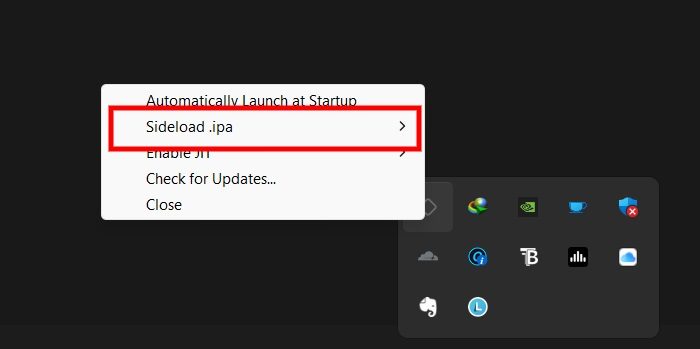
The one-time desktop step that installs SideStore onto your iPhone.
2. Trust the app and enable Developer Mode
- Go to Settings > General > VPN & Device Management.
- Under your Apple ID email, tap the profile and choose Trust.
- On iOS 16 and later, open Settings > Privacy & Security, scroll to Developer Mode, turn it on, and let the phone restart.
3. Turn on the refresh VPN
SideStore refreshes apps through a small local VPN profile called LocalDevVPN, which you install as a separate free app from the App Store. It doesn’t route your traffic anywhere — it just lets the phone reach itself to re-sign apps. (Older SideStore builds used WireGuard or StosVPN for this; current versions expect LocalDevVPN, so install that one.)
- Open the LocalDevVPN app and let it add its VPN configuration; tap Allow when iOS asks.
- Open SideStore and connect the VPN when prompted, or toggle it on under Settings > VPN.
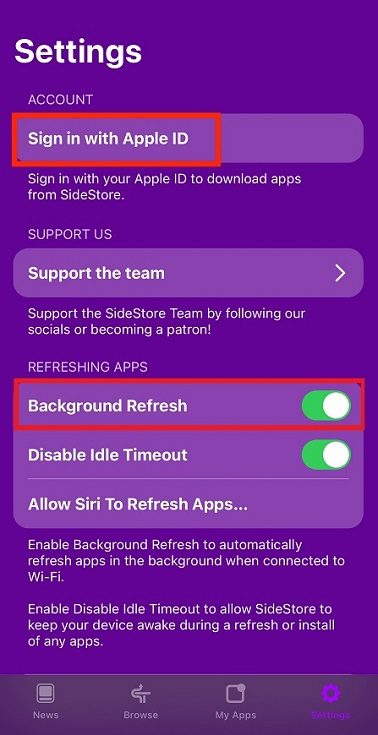
Turn on Background Refresh so SideStore re-signs apps over Wi-Fi before they expire.
4. Sign in and install your IPA
- In SideStore, open the Settings tab and sign in with the same Apple ID you used in iloader.
- Go to the My Apps tab.
- Tap the + in the corner, browse to your IPA file (it can live in the Files app), and select it.
- Let SideStore sign and install it. The new app lands on your Home Screen.
To keep apps from expiring, open My Apps and tap the 7 DAYS counter on an app, or use Refresh All. With LocalDevVPN connected and the phone on Wi-Fi, SideStore tries to do this on its own in the background.
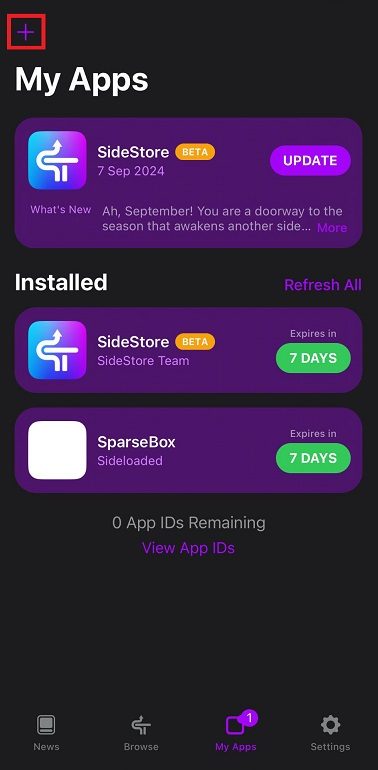
Tap the + in My Apps to add your IPA; the 7-day counter shows when each app re-signs.
Tips and troubleshooting
“Untrusted Developer” when you tap the app. You skipped the trust step. Go to Settings > General > VPN & Device Management, tap your Apple ID, and choose Trust. The app opens after that.
The app dies after about a week. Free Apple ID certificates last 7 days — that’s Apple’s limit, not a SideStore bug. As long as LocalDevVPN is connected and you’re on Wi-Fi, SideStore re-signs before the counter hits zero. If an app already expired, open My Apps and hit Refresh All to revive it.
“You’ve reached the maximum number of apps.” A free account caps you at 3 sideloaded apps at once (SideStore itself counts as one), plus a rolling limit of 10 distinct app IDs per week. Remove an app you don’t need, or look into LiveContainer to run several apps inside one slot. A paid Apple Developer account ($99/year) raises the cap and stretches the certificate to a year.
Signing fails on iOS 26.4 or later. Apple changed how lockdown connections are validated on the device, which broke on-device signing in 26.4. Disabling Private Wi-Fi Address and re-pairing alone won’t fix it. Work through these in order:
- Update SideStore to the current Nightly/Alpha build.
- Open the LocalDevVPN app and, under its Network Configuration settings, set the Tunnel/Device IPs to an unused address inside your Wi-Fi network’s IPv4 subnet (check Settings > Wi-Fi > ⓘ for that range).
- Optional: turn Private Wi-Fi Address off for that network and re-import your pairing file in iloader.
It worked, then quit after a major iOS update. Big updates can break the pairing file. Reconnect to the computer and reinstall SideStore to regenerate it.
Uninstalling and cleaning up
To remove a sideloaded app, delete it from the My Apps tab in SideStore or press-and-hold it on the Home Screen and choose Remove App. To clear the rest, open Settings > General > VPN & Device Management, tap the profile under your Apple ID, and remove it. The signing certificate stays tied to your Apple ID, so signing back in later reuses the same one rather than starting fresh.
FAQ
Do I need the computer every time I install an app?
Only for the first setup. Once SideStore and LocalDevVPN are running, you add IPAs and refresh apps entirely on the phone over Wi-Fi — the computer can stay off.
Why does my app stop opening after a few days?
Free developer certificates are valid for 7 days, so any sideloaded app expires on that clock. SideStore renews it in the background when the VPN is on, which is the whole reason the tool exists. If the phone sits off Wi-Fi long enough that a certificate fully expires, a single Refresh All may not be enough — you might have to re-sign or reinstall the app, and a revoked certificate can mean signing in again.
Is SideStore safe to sign in to with my real Apple ID?
It signs apps with a standard developer certificate from your account, the same mechanism Apple uses for test builds. Plenty of people still prefer a secondary Apple ID so a revoked certificate or a soft-lock never touches their main account.
SideStore asks a little more of you up front than a one-tap installer, and you trade that for not chaining yourself to a desktop app. Get the pairing file and LocalDevVPN sorted once, leave the VPN on, and the weekly expiry mostly takes care of itself. If the setup ends up being more trouble than you want, the pillar guide lays out the alternatives side by side.